

Self-Hosted PostgreSQL
July 2026 Ankik field note: self-hosting PostgreSQL reduced infrastructure cost, while backups, patching, and recovery became our responsibility.

Dhanji Bhagat
Founder, Emiote
Fully hosted platform. Automated backups and SLA.
$16/mo for RDS db.t3.micro
Private compute. Zero seat taxes; team runs ops.
Rs 40/mo extra (part of same VM) + S3 for backups
Self-Hosted PostgreSQL is the practice of running the open-source relational database directly on production virtual machines rather than using managed cloud services. It eliminates cloud database markups and connection limits, requiring teams to manage automated backups, failover replication, patching, and memory allocation manually.
Scope and currency
This is a July 2026 deployment snapshot from Ankik beta, not a current Amazon RDS quote or a universal reliability recommendation. Cost comparison excludes team operating time and should be re-priced for your region, storage, backups, and recovery requirements. Editorial review: 2026-08-10.
Deployment snapshot: Ankik, July 2026
Ankik uses PostgreSQL. Initially on RDS db.t3.micro ($16/mo). It worked well: auto backups, auto updates.
For ~50 beta users, $16 for the database alone felt high. Total with EC2 was ~$39/mo.
We moved Postgres onto the same application VM that runs the app (self-hosted, not full Supabase self-host).
Cost breakdown
| Setup | Monthly cost | What you get |
|---|---|---|
| RDS db.t3.micro | $16 + storage extra | Managed, auto backup, auto patch |
| Self-hosted on same VM | Rs 0 extra compute (shares VM RAM) + ~Rs 40 S3 | You manage everything |
The Good
- Marginal infrastructure cost can be near zero if a correctly sized 4GB VM already exists; operations still cost time
- Full control: we enabled
pg_stat_statementsfor slow-query visibility - Lower latency: app and DB on the same VM, with no network hop
- No free-tier connection caps like some serverless Postgres products
The Bad: What Actually Breaks
- Backups: RDS did them daily. Now we run off-box dumps (and pgbackrest where it matters). If you skip this, data-loss risk is effectively total.
- Updates: RDS patched Postgres for us. We patch manually on a schedule.
- Outage at 2 AM: RDS would auto-restart. Our VM Postgres stopped once due to OOM; we added Uptime Kuma → Telegram.
- RAM floor: On 2GB, Postgres + app crashed. We moved to 4GB.
When to use / When to skip
Self-host Postgres if:
- Roughly under ~10k users and DB size under ~20GB (your mileage varies)
- Someone has basic Docker competence
- You can run daily backups and a restore drill on a calendar
Keep RDS (or managed Postgres) if:
- No one will own ops
- You cannot afford multi-hour recovery improvisation
- You need point-in-time recovery without building it yourself
How we run it safely (checklist)
# docker-compose.yml snippet
postgres:
  image: postgres:15-alpine
  restart: unless-stopped
  environment:
    POSTGRES_PASSWORD: ${DB_PASSWORD}
  volumes:
    - pgdata:/var/lib/postgresql/data
command: postgres -c shared_buffers=512MB -c max_connections=100- Backup: Daily to S3; weekly full + daily WAL via pgbackrest where required
- Restore test: Every 15 days we restore on a local machine
- Monitoring: Postgres down → Telegram alert
- Prefer 4GB RAM when app and Postgres share one VM
As of the August 2026 editorial review, we had run this path for about a month on Ankik beta: zero data loss, one manual restart after OOM.
If your team can own this checklist, self-hosting may lower the infrastructure bill. If it cannot, managed RDS is often the safer choice. Need help choosing Postgres self-host vs RDS? Book a Reframe audit for Postgres ($199). Same trade-off lens as open-source evaluation.
What it replaces
Amazon RDS, Supabase Cloud DB, Neon, PlanetScale.
Architecture
flowchart TD
    App -->|TCP 5432| Postgres[Postgres 15-alpine]
    Postgres -->|WAL + dumps| S3[Backups S3]
    UptimeKuma -->|alert| Telegram
Visual Tour / Workflow
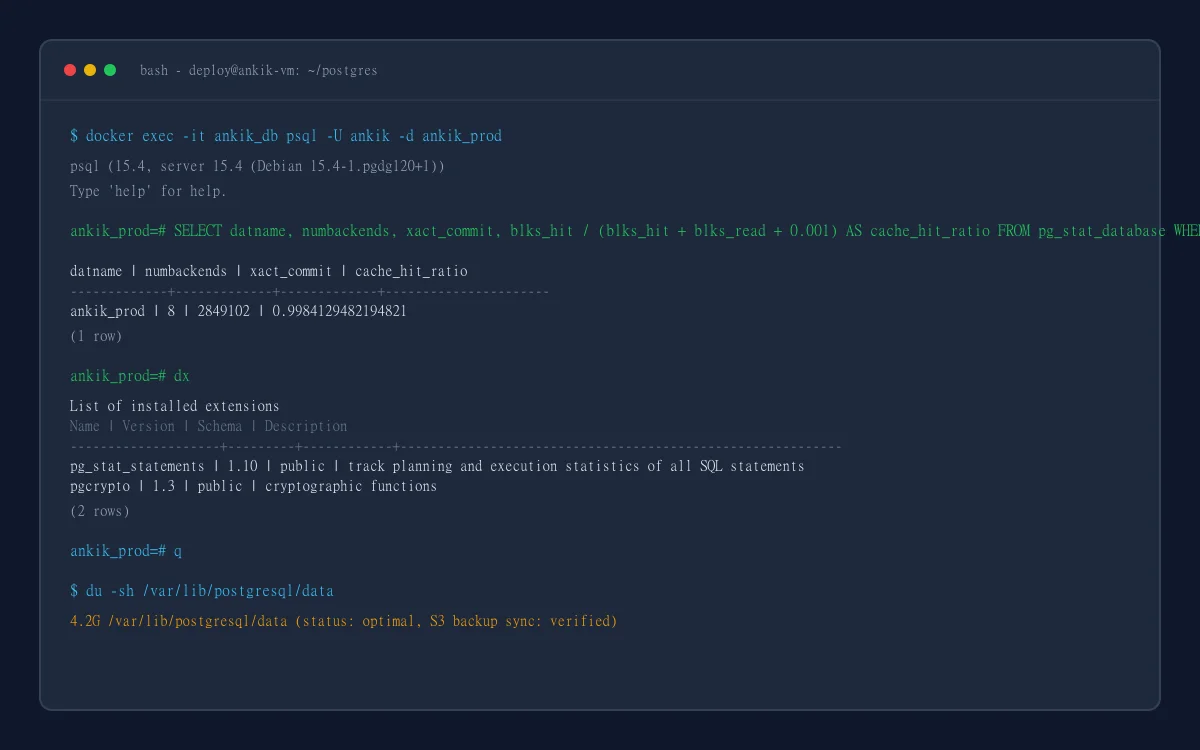
Operational verification of containerized PostgreSQL with connection pooling and automated WAL archiving.
Quickstart / Deployment
Deploy via Docker Compose on a minimum 4GB RAM virtual machine, configure pg_stat_statements for query tracking, and set up daily S3 backup rotation.
Recommendation
Self-host PostgreSQL when database size is under 20GB, team members understand Docker volume persistence and WAL archiving, and daily backup restore drills are practiced regularly. Choose managed cloud services when high availability SLA guarantees and multi-region failover are required without in-house systems operations.
Need help choosing Postgres self-host vs RDS?
Reframe ($199) prices the full trade-off: VM time, backups, restore drills, and managed Postgres, not license alone. Same five-point check we use on every database decision.
Fixed $199 fee · 100% vendor-neutral review · 3-day delivery guarantee