

Agentic Inbox
Cloudflare Agentic Inbox is an Apache-2.0 self-hosted email client combining Cloudflare Workers, Durable Objects, R2, Email Service, and Workers AI.

Dhanji Bhagat
Founder, Emiote
Fully hosted platform. Automated backups and SLA.
Google Workspace Starter: $7/user/month; Zoho Mail Lite: $1/user/month billed annually
Private compute. Zero seat taxes; team runs ops.
Potentially $0 within applicable Cloudflare free allocations; paid usage and service limits apply
Agentic Inbox is an Apache-2.0, self-hosted email client from Cloudflare that runs on Cloudflare Workers. It routes inbound mail through Email Routing, stores each mailbox in a Durable Object with SQLite and attachments in R2, and adds an AI agent powered by the Agents SDK and Workers AI for inbox search, drafting, and email actions.
1. Scope and Currency
This is an architecture evaluation, not a deployment diary. We reviewed the public repository, package manifest, setup instructions, security policy, current Cloudflare Workers/Workers AI/Durable Objects documentation, and current managed-email pricing.
We have not operated Agentic Inbox in production, so this note does not claim production latency, throughput, uptime, memory consumption, or operational scale.
The repository is an active main branch rather than a versioned release: GitHub currently shows no published releases. The architecture and feature claims below describe the public repository. They should not be interpreted as proof that Cloudflare’s own production email systems use this exact deployment topology.
Contrast with our notes on (self-hosted Postgres): those are lived ops. This page is “what the design implies.” Background on Cloudflare’s Email Service + Agents path: Email for Agents.
2. What It Is
Agentic Inbox is closer to a complete email application than an AI demo. The repository provides:
- Sending and receiving email via native edge bindings
- Rich-text composition powered by TipTap
- Reply and forward threading
- Folders and message organization
- Full-text search
- R2 attachment handling
- Per-mailbox Durable Objects with embedded SQLite state
- An AI side panel with persistent agent chat history
- Automatic draft generation triggered by incoming mail
- Model Context Protocol (MCP) access at
/mcp
The repository currently describes nine email-agent tools for reading, searching, drafting, and sending mail, while outbound sending remains strictly confirmation-gated.
3. What It Replaces — And What It Doesn’t
The obvious alternatives are managed email providers such as Google Workspace, Zoho Mail, and Fastmail. But the architectural comparison is more important than the feature checklist.
A managed provider gives you:
- Mail infrastructure and deliverability operations
- Administration, user provisioning, and domain management
- Backups and point-in-time recovery processes
- Dedicated operational support
- Organization-wide identity and compliance policies
- A mature security, antispam, and abuse-control surface
Agentic Inbox instead gives you an application you deploy into your Cloudflare account. That makes it interesting when control over the application architecture matters more than outsourcing the whole mail stack.
It is less compelling when email is simply infrastructure your team wants to stop thinking about.
4. Architecture & Tech Stack Review
Agentic Inbox executes entirely within Cloudflare’s edge platform. Incoming emails enter through Cloudflare Email Routing, route to a Hono-based Worker, and dispatch to dedicated per-mailbox Durable Objects.
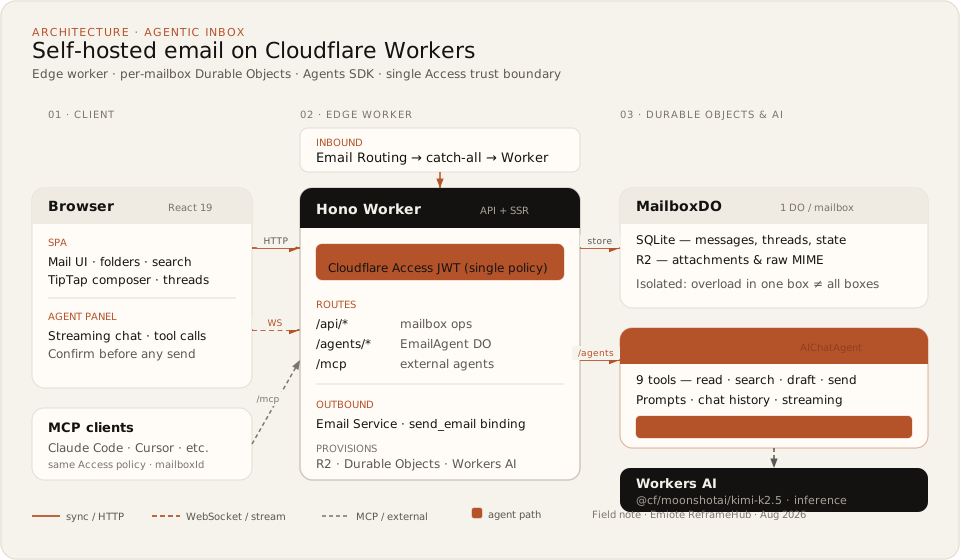
Stack Implementation
| Layer | Implementation | Notes |
|---|---|---|
| Frontend | React 19, React Router v7, Tailwind CSS, Zustand, TipTap, @cloudflare/kumo | Modern SPA with rich-text composer and side-panel agent |
| Application Runtime | Cloudflare Workers | Serverless edge execution |
| HTTP Framework | Hono | Lightweight edge routing and API handling |
| Mailbox State | Durable Objects + SQLite | Stateful boundary with local relational queries |
| Attachment Storage | Cloudflare R2 | S3-compatible zero-egress object storage |
| Email Ingress | Cloudflare Email Routing | Inbound catch-all routing to Worker |
| Email Egress | Cloudflare Email Service / send_email | Edge binding for outbound email delivery |
| Agent Runtime | Cloudflare Agents SDK / AIChatAgent | Stateful agent execution and WebSocket streaming |
| Model Layer | Workers AI (@cf/moonshotai/kimi-k2.5) | Serverless inference on Cloudflare GPUs |
| AI Interface | AI SDK v6 | Unified tool calling and streaming primitives |
| Authentication | Cloudflare Access JWT | Zero Trust boundary protecting web UI and APIs |
| Agent Interface | Web UI + MCP at /mcp | External agent integration for Claude Code, Cursor, etc. |
The package manifest independently confirms the major application dependencies and the Cloudflare product bindings.
┌─────────────────────┐
│       Browser       │
│  React email client │
│   + Agent panel     │
└──────────┬──────────┘
           │
           ▼
┌─────────────────────┐
│     Hono Worker     │
│  API + application  │
└──────┬───────┬──────┘
       │       │ mailbox
       │       │ /agents/*
       ▼       ▼
┌──────────────┐   ┌────────────────┐
│  Mailbox DO  │   │ EmailAgent DO  │
│    SQLite    │   │  AIChatAgent   │
│   R2 refs    │   │  9 mail tools  │
└──────────────┘   └───────┬────────┘
                           │
                           ▼
                   ┌─────────────────┐
                   │   Workers AI    │
                   └─────────────────┘

Inbound mail:  Cloudflare Email Routing → Worker → Mailbox Durable Object
Outbound mail: Email Service / send_email binding
Why Durable Objects Make Sense Here
A mailbox is naturally stateful. Email threads, folders, messages, drafts, and agent state all benefit from having a stable application object representing the mailbox.
Durable Objects provide that stateful boundary while SQLite provides relational storage inside the object. The repository therefore avoids building a conventional:
Workers ──► PostgreSQL ──► Object Storagestack just to represent individual mailboxes. That is one of the project’s strongest architectural choices: storage is co-located with the mailbox actor, eliminating connection pooling overhead and external database management.
Where the Boundary Stops: Storage Isolation vs. Authorization Isolation
The important caveat is that data isolation and authorization are not the same thing.
The repository isolates each mailbox in its own Durable Object, but also explicitly notes that any user passing the shared Cloudflare Access policy can access all mailboxes. The MCP endpoint uses the same trust boundary.
So the architecture is better described as:
Per-mailbox storage isolation behind a shared application authorization boundary
rather than:
Multi-tenant mailbox authorization
That distinction matters if multiple independent users or external customers will share one deployment.
AI Agent Architecture
The agent is not simply a chatbot sitting beside the inbox. The repository connects an AIChatAgent to email-specific tools that can read, search, draft, and send mail. New inbound mail can also trigger draft generation. The final send remains explicitly confirmed by the user.
Cloudflare’s current Agents platform separately documents email as a first-class agent communication channel, including inbound routing through Email Service and outbound mail through a send_email binding.
That makes Agentic Inbox useful as a reference implementation for a broader pattern:
Inbound Email ──► Stateful Agent ──► Tools ──► Human Approval Gate ──► Outbound DeliveryThe approval boundary is particularly important. Draft generation can be automated; sending an email is treated as a consequential action requiring confirmation.
Model Context Protocol (MCP) Interface
The application exposes an MCP server at /mcp. This is more significant than simply having an HTTP API.
The repository states that external AI clients such as Claude Code and Cursor can operate on mailboxes through MCP, with mailboxId identifying the target mailbox. However, the same Access policy protects the endpoint, and the repository explicitly states there is no per-mailbox authorization.
That means MCP expands the application’s control surface without changing its authorization model. For a single-user deployment, that is a powerful developer feature. For a multi-user deployment, it is a security boundary that should be reviewed before exposing the server to external agents.
5. Visual Tour & Interface Workflows
The repository includes an official application screenshot, showcasing the full email client with the AI agent side panel.
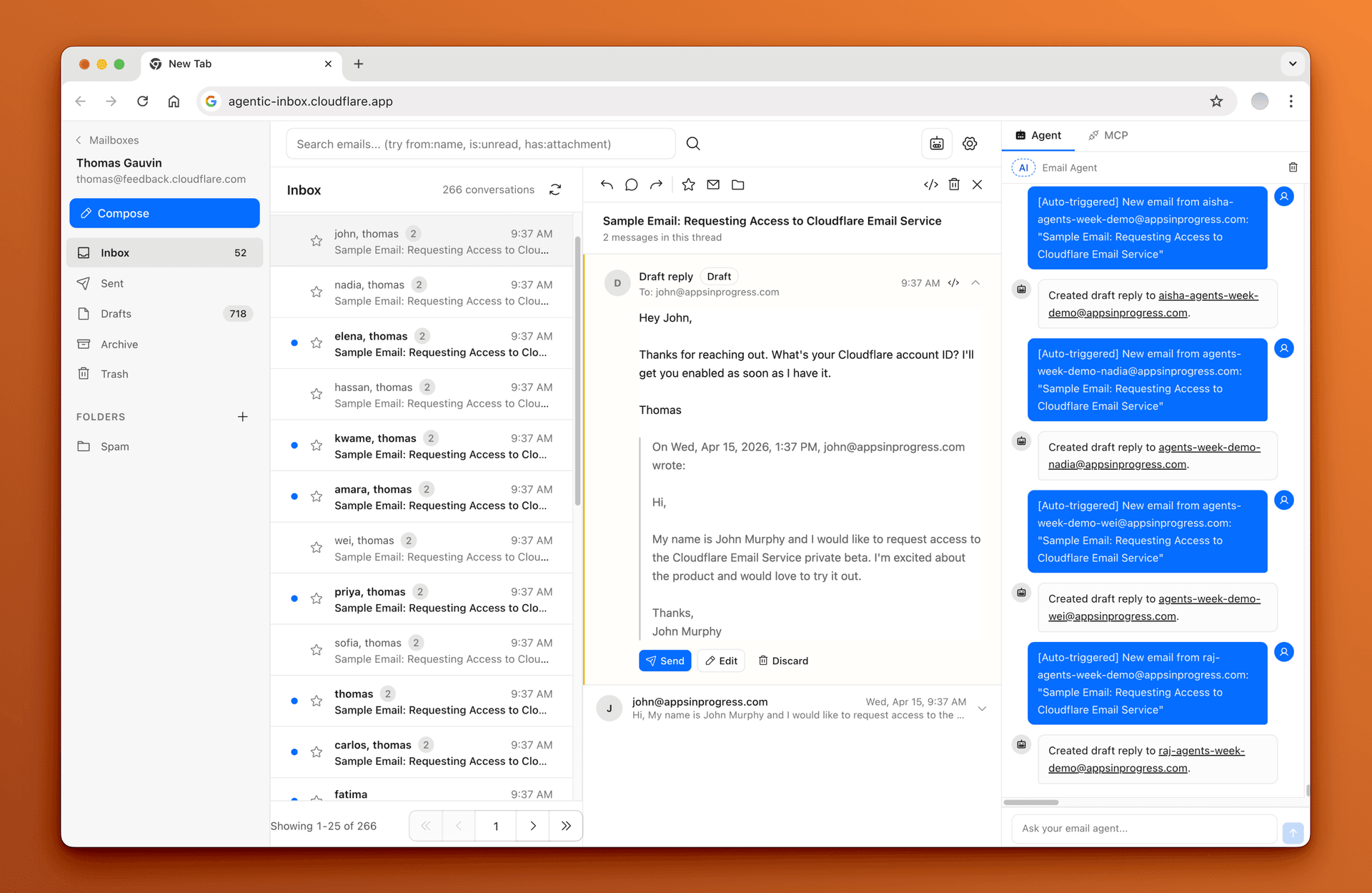
The Agentic Inbox client: tip-tap email editor, thread view, folder hierarchy, and streaming AI agent side panel.
The Human-in-the-Loop Execution Lifecycle
The most useful workflow to understand is not merely the inbox UI, but how autonomous drafting interacts with explicit human confirmation gates:
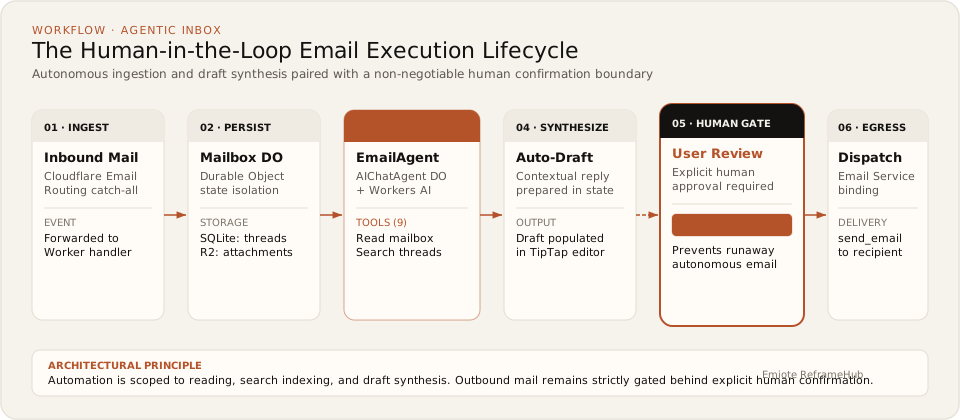
- Inbound Ingestion: Email Routing catches incoming mail on your custom domain and routes it to the Worker.
- Mailbox Persistence: The message is stored in the specific mailbox Durable Object (relational metadata in SQLite, attachments in R2).
- Agent Inspection:
EmailAgentDO reads the conversation context and searches related threads using its 9 built-in tools. - Draft Synthesis: Workers AI generates a proposed reply tailored to the thread context.
- Human Review Gate: The draft is presented in the composer. Outbound sending remains locked until the user explicitly reviews and approves.
- Outbound Dispatch: Upon confirmation, the message is dispatched via Cloudflare Email Service (
send_emailbinding).
6. Total Cost of Ownership (TCO)
The important correction to the usual “open source = free” argument is that Agentic Inbox has several Cloudflare services in its operating path.
Infrastructure Economics Comparison
| Dimension | Agentic Inbox (Self-Hosted on Cloudflare) | Managed Email (Google Workspace / Zoho Mail) |
|---|---|---|
| Application License | Apache-2.0 / $0 | Included in monthly subscription |
| Worker Runtime | Free allocation available; Paid starts at $5/month | Included ($0 extra) |
| Durable Objects | Free allocation available; billed on paid usage | Included ($0 extra) |
| R2 Storage | 10 GB-month free; $0.015/GB-mo thereafter | Included (pooled 30 GB+ per user) |
| Workers AI | 10,000 neurons/day free; paid usage thereafter | Provider-dependent (Gemini add-ons extra) |
| Email Infrastructure | Cloudflare Email Routing + Email Service | Fully managed infrastructure & deliverability |
| Backups & Restore | Your responsibility | Provider-managed automated snapshots |
| Monitoring & Uptime | Your responsibility (Cloudflare dashboard) | Provider-managed 99.9% uptime SLA |
| Authorization Design | Your responsibility beyond shared Access policy | Provider-managed granular IAM |
| Operational Support | Community / Your engineering time | Vendor support contracts |
| Annualized Cost | Workload-dependent ($0–$60+/year) | $60–$420/year (for 5 users) |
Free Tier Limits & Usage Boundaries
- Workers: 100,000 requests/day on the Free plan. Workers Paid starts at $5/month.
- Workers AI: 10,000 neurons/day free. High-volume automatic drafting on every inbound message will quickly cross free neuron limits into paid inference.
- R2 Storage: 10 GB-month standard storage, 1M Class A operations, and 10M Class B operations per month included for free.
- Durable Objects: Separate compute, storage, and request limits apply.
Managed Subscription Comparison
- Google Workspace Starter: Listed at $7/user/month billed annually.
- Zoho Mail Lite: Listed at $1/user/month billed annually.
For a 5-user team, the annual subscription arithmetic is:
- Google Workspace: $7/user/mo × 5 users × 12 months = $420/year
- Zoho Mail Lite: $1/user/mo × 5 users × 12 months = $60/year
Those figures are subscription comparisons, not equivalent TCO measurements. Managed providers bundle substantially more operational responsibility (antispam reputation, compliance retention, user lifecycle management) into the price tag.
For Agentic Inbox, an honest annual cost cannot be reduced to one static number without knowing email volume, AI drafting frequency, attachment sizes, and Cloudflare plan tiers.
7. The Good
- Stateful architecture fits the domain: A mailbox maps naturally to a Durable Object actor. SQLite provides local relational state without requiring an external database cluster.
- It is a real email application: This is not just a chat window attached to an inbox. The repository includes rich composition, threading, folders, search, and attachments.
- Human approval is explicit: The agent can inspect and draft replies, but sending is strictly confirmation-gated.
- The stack is internally coherent: Workers, Durable Objects, R2, Email Routing, Email Service, Agents SDK, and Workers AI all belong to the same Cloudflare platform, eliminating multiple external vendor integrations.
- An excellent architecture reference: Even if you never deploy the application, the repository demonstrates a pristine blueprint for building stateful, email-driven agents on Workers.
8. The Bad — What to Know Before Adopting
- The shared Access policy is the real authorization boundary: This is the biggest architectural caveat. Per-mailbox Durable Objects do not give you per-user authorization. Anyone who passes the Access policy can reach all mailboxes and invoke MCP on any
mailboxId. Fine for a solo operator; unacceptable for multi-tenant teams without custom auth. - “Self-hosted” still means Cloudflare-hosted: You control the deployment in your Cloudflare account, but the codebase depends entirely on proprietary Cloudflare primitives (Workers, DO, R2, Email Routing, Email Service, Access, Workers AI). It cannot run on a generic Linux VPS.
- Free tier is a starting point, not a capacity guarantee: Automatic drafting on every incoming email can exhaust the 10,000 neurons/day Workers AI allowance before storage even becomes a consideration.
- Deployment is not one click: The repository explicitly warns that the Cloudflare deploy button is only part of the setup. You still must manually configure Access, DNS Email Routing rules, Email Service bindings, and mailboxes.
- No evidence for production-grade mail operations: The public repository does not provide enterprise mail retention, compliance e-discovery, point-in-time recovery, formal deliverability SLAs, or organization-wide audit trails.
9. Security Review
The application maintains a published security policy and routes vulnerability reports through Cloudflare’s disclosure process. No public security advisories were reported at review time.
The primary architectural security consideration is authorization scope:
Single-User Solo Model (Works as Designed):
Internet ──► Cloudflare Access JWT ──► Agentic Inbox ──► Any Mailbox DO

Multi-Tenant Team Model (Requires Custom Auth):
Internet ──► Cloudflare Access ──► Identity Layer ──► Tenant Auth ──► Mailbox Auth ──► Mailbox DO
The MCP endpoint at /mcp requires the same scrutiny because external coding agents can query and manipulate mailbox state across all IDs under the shared Access token.
10. Licensing
The repository is licensed under Apache-2.0, a permissive open-source license suitable for modification and redistribution subject to its terms.
The open-source code license does not alter the commercial terms or usage fees of external Cloudflare services, AI model checkpoints, or upstream npm dependencies.
11. Quickstart & Deployment Guide
Local Development
# 1. Clone the repository
git clone https://github.com/cloudflare/agentic-inbox.git
cd agentic-inbox

# 2. Install dependencies
npm install

# 3. Configure local environment
# Set your domain in wrangler.jsonc and ensure R2 bucket 'agentic-inbox' exists
cp .dev.vars.example .dev.vars

# 4. Start local development server
npm run dev
Production Deployment Sequence
- Deploy the Worker: Run
npm run deployor use the Deploy to Cloudflare button. - Configure Cloudflare Access: Enable one-click Access for Workers; obtain the
POLICY_AUD(Audience tag) andTEAM_DOMAIN(Zero Trust team URL) from the Access modal. - Set Worker Secrets: Set
POLICY_AUDandTEAM_DOMAINas Worker environment variables. - Configure Email Routing: In Cloudflare dashboard, configure an Email Routing catch-all rule pointing to your deployed Worker.
- Enable Email Service: Enable the
send_emailbinding for outbound egress. - Create a Mailbox: Open the web application and register your email address on the verified domain.
Common Setup Troubleshooting
| Symptom | Root Cause / Resolution |
|---|---|
Invalid or expired Access token | Mismatched POLICY_AUD or TEAM_DOMAIN. Toggle Access off and on in Cloudflare dashboard to refresh modal values, then update Worker secrets. |
Cloudflare Access must be configured in production | Access is required outside local development to prevent public exposure. Ensure Zero Trust Access is enabled. |
12. When to Use Agentic Inbox
Good Fit
- You already operate on Cloudflare (domain, DNS, Workers, Zero Trust Access).
- You want an AI-assisted personal inbox running directly in your own account.
- A single Access trust boundary matches your security model (solo founder or tight internal team).
- Your email and drafting volume fits within applicable Cloudflare free or low-tier allocations.
- You want an open reference architecture for building stateful Workers + DO + Agents applications.
Bad Fit
- You require strict per-mailbox user authorization or multi-tenant customer isolation.
- Your organization requires managed email SLAs, enterprise e-discovery, or compliance retention policies.
- You require all email data to reside on independent hardware or non-Cloudflare VPS infrastructure.
- Nobody on your team is comfortable operating Wrangler, Cloudflare bindings, and DNS routing.
13. ReframeHub Insight
The Interesting Part Is Not the AI
The defining architectural decision in Agentic Inbox is the state boundary.
Email is inherently stateful. Each mailbox has a distinct lifecycle, identity, and relational boundary. By mapping each mailbox directly to a Durable Object, Cloudflare achieves:
Mailbox Identity ──► Durable Object ──► SQLite State + R2 Attachments + Agent ContextThis creates a self-contained actor model without the operational drag of connection pools, database migrations, or separate cache layers.
However, it highlights an essential engineering rule:
Storage isolation does not automatically equal authorization isolation.
Agentic Inbox cleanly isolates data across Durable Objects, but places all objects behind a single Access policy. That is an elegant shortcut for a personal tool; it is a critical vulnerability if imported naively into a multi-tenant SaaS.
14. What I Would Change
Principal Engineering Critique: If evolving this architecture into a production multi-user platform, I would preserve the Durable Object mailbox model while introducing an explicit application authorization layer before both the HTTP and MCP endpoints:
- Granular mailbox ownership and role-based access control (RBAC)
- Scoped MCP permissions per API token rather than open
mailboxIdrouting - Explicit audit logging for all agent tool calls and send events
- Point-in-time SQLite backup export to external cold storage
- Configurable auto-draft triggers with budget rate-limiters per mailbox
The underlying edge topology does not need to change; the identity and operational boundary does.
15. Our Recommendation
Apply the Keep / Configure / Replace / Build lens:
- Keep: Keep Agentic Inbox as a premier Cloudflare-native architectural reference. The synergy of Workers, Durable Objects, SQLite, R2, Email Service, and Agents SDK is instructive.
- Configure: Configure it for personal email or tightly controlled single-operator setups where a single Access policy is acceptable.
- Replace: Replace with managed email (Google Workspace / Zoho Mail) when email is an operational dependency rather than your core product.
- Build: Build on this pattern if email workflows and stateful agents are central to your SaaS product.
Need help evaluating managed mail vs. a self-hosted Cloudflare edge architecture? Book a Reframe audit for email stack ($199 USD). For a parallel evaluation of self-hosted database infrastructure, read our Supabase and Self-Hosted Postgres field notes.
16. Primary Sources
Need help choosing managed mail vs self-host on Cloudflare?
Reframe ($199) audits email seats, self-host ops, auth boundaries, and AI tooling against total cost—not hype. We recommend Keep when Workspace or Zoho still wins.
Fixed $199 fee · 100% vendor-neutral review · 3-day delivery guarantee